Rei Vilo's fischertechnik Corner
  • About
  • Blog
  • Reviews
    • How to Start?
    • Controllers >
      • Robotics TXT
      • TXT 4.0 Controller
      • Bluetooth Smart Beginner Set
      • Interface Boards for fischertechnik Models
      • Didacta Advance Pi-F5 interface board
    • Sets >
      • Technical Revolutions Set
      • Pneumatic Power Set
      • Automation Robots Set
      • Electro-Pneumatic Set
      • Starter Set for micro:bit
      • Bluetooth Smart Beginner Set
      • Robotics TXT Smart Home Set
    • Exploring the Lego World >
      • Purchasing
      • Unboxing
      • Installing
      • Building
      • Programming
      • Connecting
      • Playing
      • Expanding
      • Concluding
  • Models
    • Back to the 70's
    • Micro Models
    • New Magasin >
      • Magasin releases 1, 2 and 3
      • Long X-Axis
      • Moving Desk And Y-Axis
      • Compressed Air And Vacuum For Z-Axis
      • Pictures
      • Specifications
    • Power Saving White LED
    • Flipper with I²C LCD Panel
    • Celebrating 50 Years!
    • ft Convention 2013
    • ft Convention 2014
  • Sensors
    • Interfacing an Arduino to a Robo TX Controller >
      • Analog Interface
      • Digital Interface
      • I²C Interface
    • Standard Sensors >
      • Playing With Accelerometers
      • Proximity Sensor
      • Pressure Sensor
    • Advanced Sensors >
      • Industrial Colour Reader
      • Stepper Motor Controller
      • DC-Motor with Quadrature Encoder Controller
    • smartDevices >
      • smartColours
      • smartRFID
      • smartLED
      • smartHub
      • smartControls
      • smartMeter
      • smartCamera
      • smartNewCamera
      • smartWiFi
      • smartBLE
      • smartNode
      • smartIMU
  • RoboPro
    • Value Operations >
      • Min and Max Functions
      • Signal Management With Median
      • Modulo Function
      • Map Function
    • Standard Modules >
      • Software Managed Compressor
      • Self-Calibrated Colour-Reader
      • Standard Conveyor Belt Routine
      • Management Panel
      • Encoder-Motor Position Management
    • Variable Types >
      • CSV List Management
      • Queue Function
    • Program Structures >
      • Parallel Processing
      • Multi-Tasking End Management Procedure
    • Tutorials >
      • Setting Bluetooth LAN with Multiple TX-Cs
      • Dealing with Very Large Models >
        • Getting a General View
        • Defining User's Functions
        • Elaborating the Modelisation
        • Defining the Processes
        • Setting the Messages
        • Going Further
        • References
      • Program Error 2 Message
  • I²C
    • How to Connect an I²C Device to the Robo TX?
    • How to Connect an I²C Device to the Robotics TXT?
    • How to Manage an I²C Device?
    • How to Use an I²C Driver?
    • List of I²C Drivers for Sensors >
      • I²C Real Time Clock DS1307
      • I²C LCD screen 4 lines of 20 characters LCD03
      • I²C Triple Axis Accelerometer ADXL345
      • I²C Red-Green-Blue LED BlinkM
      • I²C Two Axis Compass HMC6352
      • I²C Triple Axis Magnetometer HMC5843
      • I²C True Colour Sensor ADJD-S371
      • I²C Stepper Controller AMIS-30624
    • List of I²C Drivers for smartDevices >
      • I²C True Colours Smart Sensor smartColours
      • I²C RFID Smart Sensor smartRFID
      • I²C 4-Digit 7-Segment LED Display smartLED
      • I²C Screen With Touch and SD-Card smartControls
      • I²C Smart Sensor smartCamera
      • I²C Smart Sensor smartNewCamera
      • I²C Remote WiFi Interface smartWiFi​
      • I²C Remote Bluetooth Interface smartBLE​
      • I²C Remote Interface smartNode​
      • I²C New LCD Screen 4 x 20 characters smartLCD
      • I²C Inertial Measurement Unit smartIMU

smartDevices for fischertechnik

First came the smart sensors and then the smart actuators.

Now, the latest peripheral for fischertechnik models combines them with a touch screen.

Smart Sensors

One of the main challenge with modern sensors is that they often require a pre-processor in charge of filtering raw data and computing usable measures.

The graphical interface of Robo Pro is perfect for programming process-oriented models but any advanced calculation ends with the spaghetti syndrome, with arrows and boxes everywhere, hard to develop and impossible to maintain. 

The idea is twofold:
  • cope with the main limitation of Robo Pro about complex calculations,
  • and leverage the robust I²C implementation of the Robo TX controller.

Picture
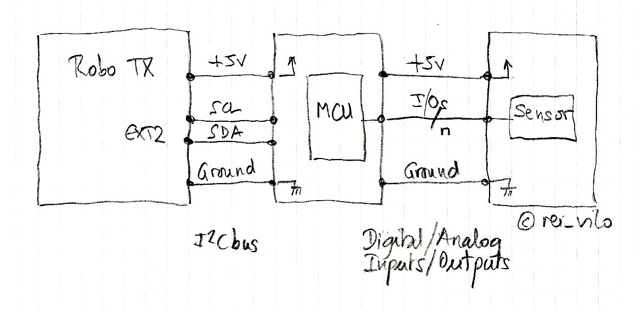
One solution is to place a MCU aka. micro-controller unit (reference) acting as a pre-processor between the sensor and the Robo TX controller to do the job.

This solution ends with a three-tiers configuration: the master, the pre-processor and the sensor.

One benefit is the pre-processor is versatile and can be reprogrammed for another sensor. The main drawback is the sensor is useless without the pre-processor.

Picture
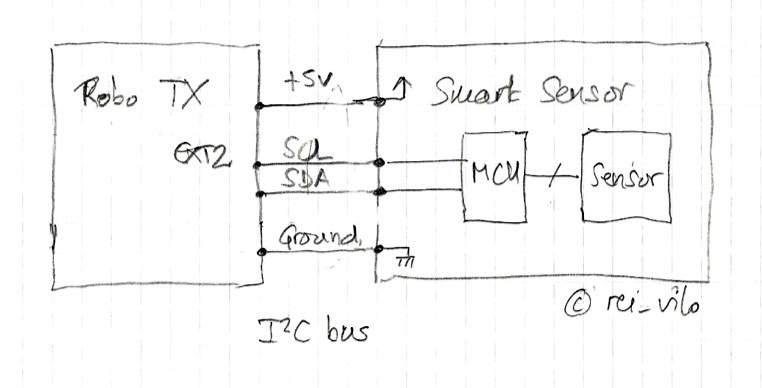
Another option consists on including the pre-processor into the sensor.

I call smart sensor such a device which includes its own MCU. 

The MCU acquires and processes the raw data provided by the sensor, performs the required calculations and delivers ready-to-use measures to the master.

The result is much simpler and saves a lot of cables.
Picture
The program for the pre-processor can be easily developed in C or C++ with a standard IDE. 

The I²C implementation on the Robo TX controller –starting Robo Pro 3.1.3– is easy to use, especially when an I²C driver is provided, works fine and is reliable.

The smart sensor thus acts as a slave I²C device.

smartDevices for fischertechnik

The same logic applies for an actuator with a built-in MCU. 

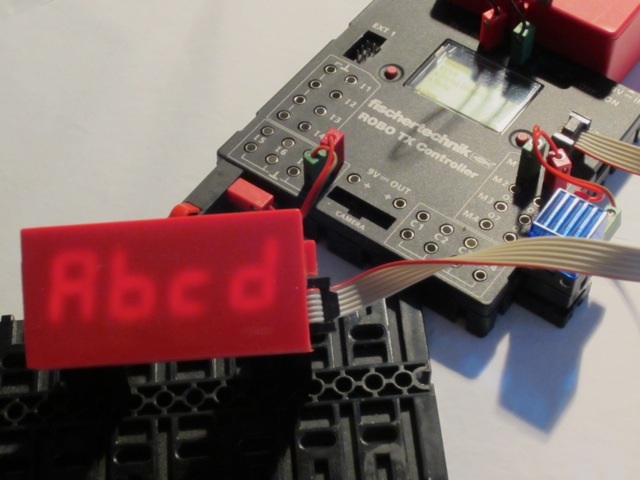
The first actuator is the 4-digit 7-segment smartLED. A hub with an active also applies, such as the smartHub with up to 4  I²C slave devices.

Another important milestone is the smartControls device, which features a touch screen and then combines both an actuator and a sensor.

All the smart sensors and smart actuators are now grouped under the same name smartDevices for fischertechnik.
Picture

Next

  • smartColours
  • smartRFID
  • smartLED
  • smartHub
  • smartControls
  • smartMeter
  • smartCamera and smartNewCamera
  • smartWiFi and ​smartBLE
  • smartNode
  • smartIMU
Powered by Create your own unique website with customizable templates.