Rei Vilo's fischertechnik Corner
  • About
  • Blog
  • Reviews
    • How to Start?
    • Controllers >
      • Robotics TXT
      • TXT 4.0 Controller
      • Bluetooth Smart Beginner Set
      • Interface Boards for fischertechnik Models
      • Didacta Advance Pi-F5 interface board
    • Sets >
      • Technical Revolutions Set
      • Pneumatic Power Set
      • Automation Robots Set
      • Electro-Pneumatic Set
      • Starter Set for micro:bit
      • Bluetooth Smart Beginner Set
      • Robotics TXT Smart Home Set
    • Exploring the Lego World >
      • Purchasing
      • Unboxing
      • Installing
      • Building
      • Programming
      • Connecting
      • Playing
      • Expanding
      • Concluding
  • Models
    • Back to the 70's
    • Micro Models
    • New Magasin >
      • Magasin releases 1, 2 and 3
      • Long X-Axis
      • Moving Desk And Y-Axis
      • Compressed Air And Vacuum For Z-Axis
      • Pictures
      • Specifications
    • Power Saving White LED
    • Flipper with I²C LCD Panel
    • Celebrating 50 Years!
    • ft Convention 2013
    • ft Convention 2014
  • Sensors
    • Interfacing an Arduino to a Robo TX Controller >
      • Analog Interface
      • Digital Interface
      • I²C Interface
    • Standard Sensors >
      • Playing With Accelerometers
      • Proximity Sensor
      • Pressure Sensor
    • Advanced Sensors >
      • Industrial Colour Reader
      • Stepper Motor Controller
      • DC-Motor with Quadrature Encoder Controller
    • smartDevices >
      • smartColours
      • smartRFID
      • smartLED
      • smartHub
      • smartControls
      • smartMeter
      • smartCamera
      • smartNewCamera
      • smartWiFi
      • smartBLE
      • smartNode
      • smartIMU
  • RoboPro
    • Value Operations >
      • Min and Max Functions
      • Signal Management With Median
      • Modulo Function
      • Map Function
    • Standard Modules >
      • Software Managed Compressor
      • Self-Calibrated Colour-Reader
      • Standard Conveyor Belt Routine
      • Management Panel
      • Encoder-Motor Position Management
    • Variable Types >
      • CSV List Management
      • Queue Function
    • Program Structures >
      • Parallel Processing
      • Multi-Tasking End Management Procedure
    • Tutorials >
      • Setting Bluetooth LAN with Multiple TX-Cs
      • Dealing with Very Large Models >
        • Getting a General View
        • Defining User's Functions
        • Elaborating the Modelisation
        • Defining the Processes
        • Setting the Messages
        • Going Further
        • References
      • Program Error 2 Message
  • I²C
    • How to Connect an I²C Device to the Robo TX?
    • How to Connect an I²C Device to the Robotics TXT?
    • How to Manage an I²C Device?
    • How to Use an I²C Driver?
    • List of I²C Drivers for Sensors >
      • I²C Real Time Clock DS1307
      • I²C LCD screen 4 lines of 20 characters LCD03
      • I²C Triple Axis Accelerometer ADXL345
      • I²C Red-Green-Blue LED BlinkM
      • I²C Two Axis Compass HMC6352
      • I²C Triple Axis Magnetometer HMC5843
      • I²C True Colour Sensor ADJD-S371
      • I²C Stepper Controller AMIS-30624
    • List of I²C Drivers for smartDevices >
      • I²C True Colours Smart Sensor smartColours
      • I²C RFID Smart Sensor smartRFID
      • I²C 4-Digit 7-Segment LED Display smartLED
      • I²C Screen With Touch and SD-Card smartControls
      • I²C Smart Sensor smartCamera
      • I²C Smart Sensor smartNewCamera
      • I²C Remote WiFi Interface smartWiFi​
      • I²C Remote Bluetooth Interface smartBLE​
      • I²C Remote Interface smartNode​
      • I²C New LCD Screen 4 x 20 characters smartLCD
      • I²C Inertial Measurement Unit smartIMU

Electro-Pneumatic Set

The models included in this set are very interesting. I really appreciate the wide range of applications for compressed air and pneumatics.

The new compressor delivers a steady flow of compressed air and represents a welcome and highly anticipated update of the previous compressor.

Unfortunately, I've experienced some issues with two models: the colour sorting robot and the ball obstacle course with vacuum picker arm.

Two issues... two solutions!
  • the colour sensor, for the colour sorting robot only
  • the rotary motor, for the two models

Colour Sensor

The colour sensor remains unchanged and still relies on a red LED. No surprise, white and red cylinders are often misread and confused.

Also enters into account the tear and wear of the cylinders. As the painting becomes less white, the colour isn't recognised accurately.

Is the true colour sensor the only capable solution?

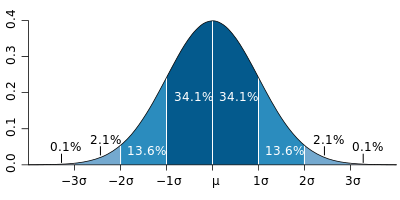
The tool we're going to use is the normal distribution, and more specifically, the fact that the [ x̅ - 3∙σ, x̅ + 3∙σ ] interval (or 6 sigma) represents 99,7% of the population.

To learn more, please refer to the article about Normal distribution  at Wikipedia.

Picture
Picture from Wikipedia 
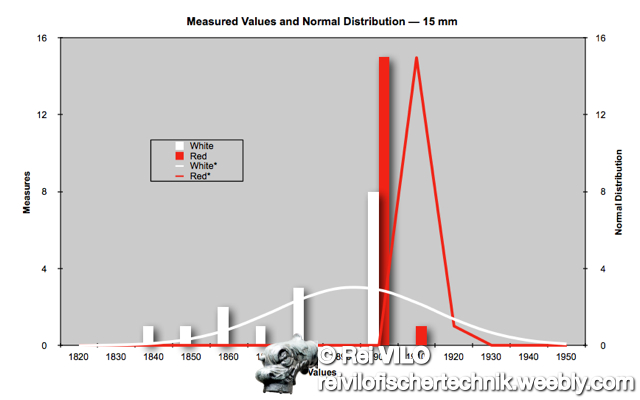
We're going to check that the normal distributions of the white and red colours don't overlap, i.e. the intersection of both intervals is close to empty.
Picture
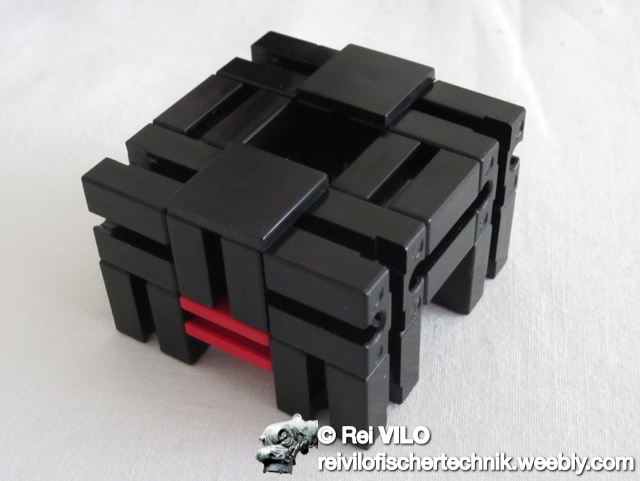
With the default casing around the colour sensor described as per the manual, the distance between the colour sensor and the cylinder is 17 mm, with
  • 15 mm for the building block 15 reference 32881 
  • and 2 mm for the black mounting plate reference 36911.
Picture
I measured again the values for the 2 faces of the 8 white cylinders and 8 red cylinders I own and calculated the new threshold values. The normal distribution of the measures speaks by itself.

Picture
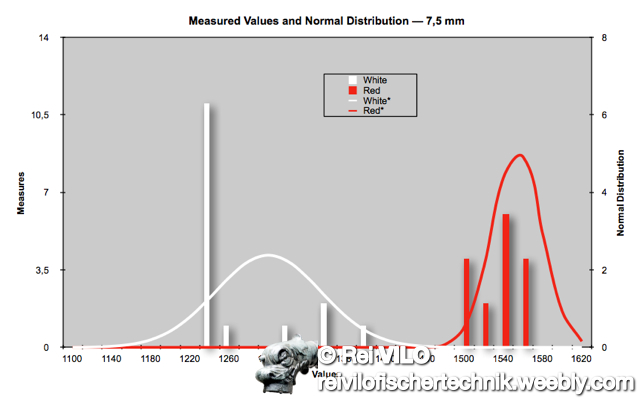
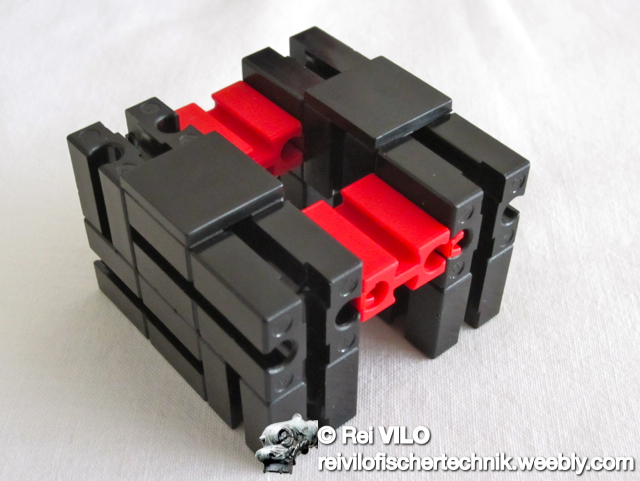
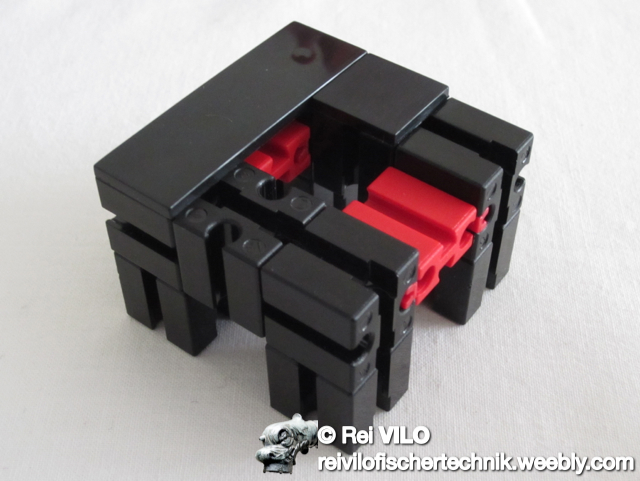
By changing two building blocks 15 reference 32881 for two building blocks of 7,5 mm reference 37468, the new distance between the colour sensor and the cylinder goes down from 17 to 9,5≈10 mm, with 
  • 7,5 mm for the building block of 7,5 mm reference 37468
  • and 2 mm for the black mounting plate reference 36911.

I performed the same measures with the white and the red cylinders as I did before. The colours are now clearly differentiated and the confidence zones based on the normal distribution no longer overlap. The wear and tear of the cylinders is not longer an issue.

The tests I performed were accurate at 100%. The process is thus fully capable.
Picture
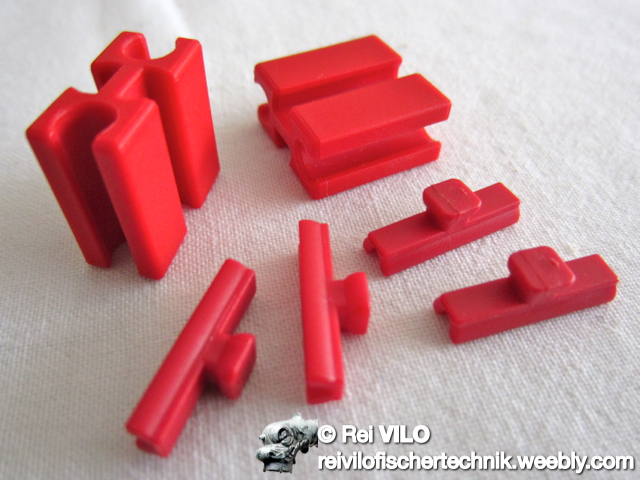
Only five additional elements are required:
  • 1 building block of 7,5 mm, reference 37468 
  • 4 spring cams, reference 31982

One building block of 7,5 mm is freed from the initial instructions and reused on the new casing.
Picture
Picture
Picture
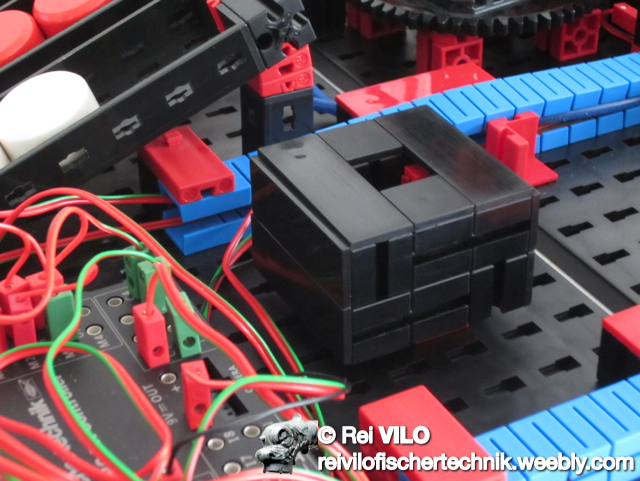
The colour sensor within its new casing offers greater precision.
This implies new threshold values. I have updated the Robo Pro program colour_sorting_robot_-_standard_10mm.rpp accordingly.
Picture

Rotary Motor

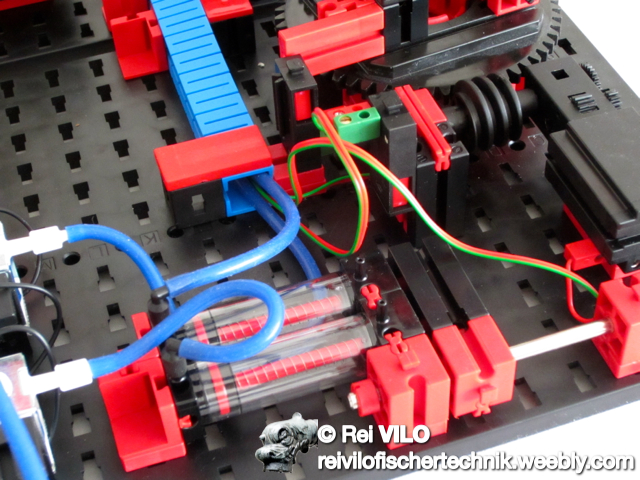
For both the colour sorting robot and ball obstacle course with vacuum picker arm, the rotary arm runs too fast and the pulse counter C1 can't provide enough precision.

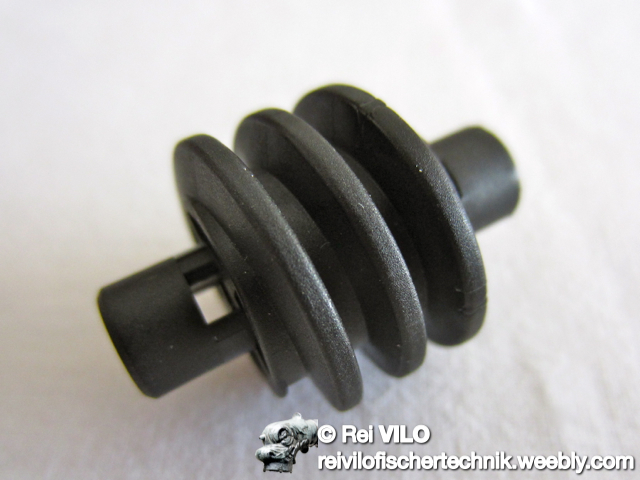
Adding one single element, the worm reference 35072, solves this issue.
Picture
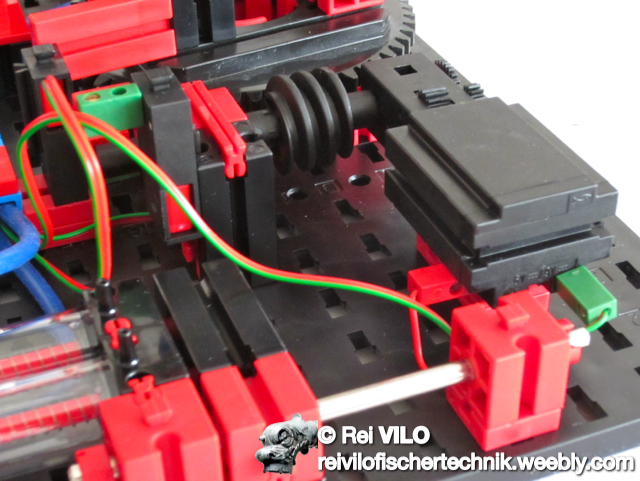
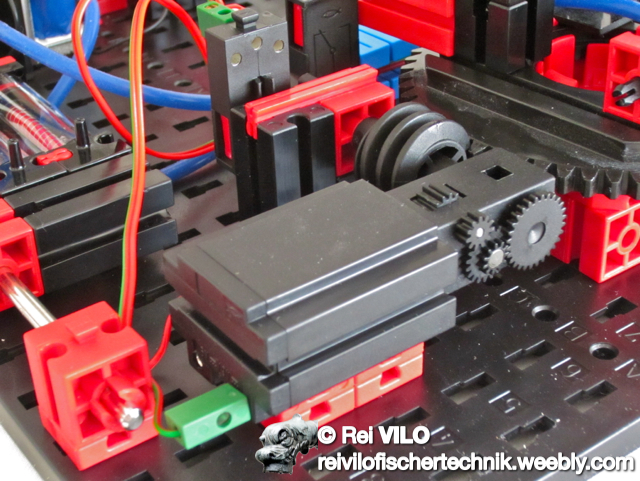
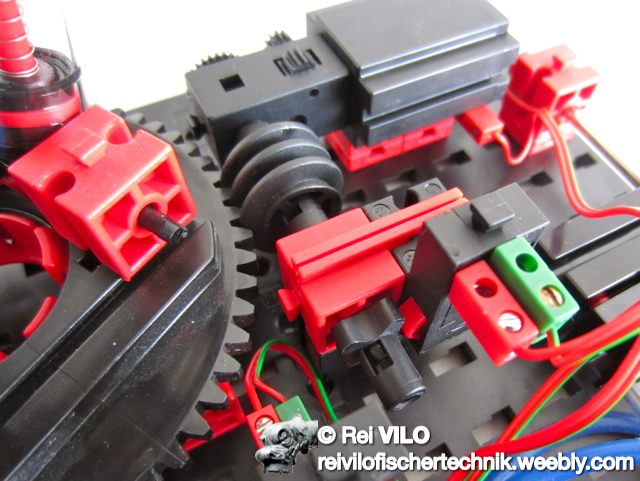
The implementation is easy and frees many elements. The vacuum generator needs to be moved.

The pictures below illustrate the new configuration.
Picture
Picture
Picture
Picture
The new values for the pulse counter need to be changed. 

The Robo Pro programs below include the new values for the colour sorting robot and ball obstacle course with vacuum picker arm.

New Programs

Colour sorting robot model
  • The program colour sorting robot - standard 17mm.rpp includes the pulse settings for the rotary arm driven by the worm but keeps standard threshold values for the colours based on the standard colour sensor with 17 mm distance.
colour_sorting_robot_-_standard_17mm.rpp.zip
File Size: 11 kb
File Type: zip
Download File

  • The program colour sorting robot - new 10mm.rpp includes the pulse settings for the rotary arm driven by the worm and also updated threshold values for the colours based on the new colour sensor with 10 mm distance.
colour_sorting_robot_-_new_10mm.rpp.zip
File Size: 11 kb
File Type: zip
Download File

Ball obstacle course with vacuum picker arm
  • The program ball obstacle couse with vacuum picker arm - revised.rpp includes the pulse settings for the rotary arm driven by the worm.
ball_obstacle_couse_with_vacuum_picker_arm_-_revised.rpp.zip
File Size: 9 kb
File Type: zip
Download File

Powered by Create your own unique website with customizable templates.