Rei Vilo's fischertechnik Corner
  • About
  • Blog
  • Reviews
    • How to Start?
    • Controllers >
      • Robotics TXT
      • TXT 4.0 Controller
      • Bluetooth Smart Beginner Set
      • Interface Boards for fischertechnik Models
      • Didacta Advance Pi-F5 interface board
    • Sets >
      • Technical Revolutions Set
      • Pneumatic Power Set
      • Automation Robots Set
      • Electro-Pneumatic Set
      • Starter Set for micro:bit
      • Bluetooth Smart Beginner Set
      • Robotics TXT Smart Home Set
    • Exploring the Lego World >
      • Purchasing
      • Unboxing
      • Installing
      • Building
      • Programming
      • Connecting
      • Playing
      • Expanding
      • Concluding
  • Models
    • Back to the 70's
    • Micro Models
    • New Magasin >
      • Magasin releases 1, 2 and 3
      • Long X-Axis
      • Moving Desk And Y-Axis
      • Compressed Air And Vacuum For Z-Axis
      • Pictures
      • Specifications
    • Power Saving White LED
    • Flipper with I²C LCD Panel
    • Celebrating 50 Years!
    • ft Convention 2013
    • ft Convention 2014
  • Sensors
    • Interfacing an Arduino to a Robo TX Controller >
      • Analog Interface
      • Digital Interface
      • I²C Interface
    • Standard Sensors >
      • Playing With Accelerometers
      • Proximity Sensor
      • Pressure Sensor
    • Advanced Sensors >
      • Industrial Colour Reader
      • Stepper Motor Controller
      • DC-Motor with Quadrature Encoder Controller
    • smartDevices >
      • smartColours
      • smartRFID
      • smartLED
      • smartHub
      • smartControls
      • smartMeter
      • smartCamera
      • smartNewCamera
      • smartWiFi
      • smartBLE
      • smartNode
      • smartIMU
  • RoboPro
    • Value Operations >
      • Min and Max Functions
      • Signal Management With Median
      • Modulo Function
      • Map Function
    • Standard Modules >
      • Software Managed Compressor
      • Self-Calibrated Colour-Reader
      • Standard Conveyor Belt Routine
      • Management Panel
      • Encoder-Motor Position Management
    • Variable Types >
      • CSV List Management
      • Queue Function
    • Program Structures >
      • Parallel Processing
      • Multi-Tasking End Management Procedure
    • Tutorials >
      • Setting Bluetooth LAN with Multiple TX-Cs
      • Dealing with Very Large Models >
        • Getting a General View
        • Defining User's Functions
        • Elaborating the Modelisation
        • Defining the Processes
        • Setting the Messages
        • Going Further
        • References
      • Program Error 2 Message
  • I²C
    • How to Connect an I²C Device to the Robo TX?
    • How to Connect an I²C Device to the Robotics TXT?
    • How to Manage an I²C Device?
    • How to Use an I²C Driver?
    • List of I²C Drivers for Sensors >
      • I²C Real Time Clock DS1307
      • I²C LCD screen 4 lines of 20 characters LCD03
      • I²C Triple Axis Accelerometer ADXL345
      • I²C Red-Green-Blue LED BlinkM
      • I²C Two Axis Compass HMC6352
      • I²C Triple Axis Magnetometer HMC5843
      • I²C True Colour Sensor ADJD-S371
      • I²C Stepper Controller AMIS-30624
    • List of I²C Drivers for smartDevices >
      • I²C True Colours Smart Sensor smartColours
      • I²C RFID Smart Sensor smartRFID
      • I²C 4-Digit 7-Segment LED Display smartLED
      • I²C Screen With Touch and SD-Card smartControls
      • I²C Smart Sensor smartCamera
      • I²C Smart Sensor smartNewCamera
      • I²C Remote WiFi Interface smartWiFi​
      • I²C Remote Bluetooth Interface smartBLE​
      • I²C Remote Interface smartNode​
      • I²C New LCD Screen 4 x 20 characters smartLCD
      • I²C Inertial Measurement Unit smartIMU

I²C 4-Digit 7-Segment LED Display smartLED

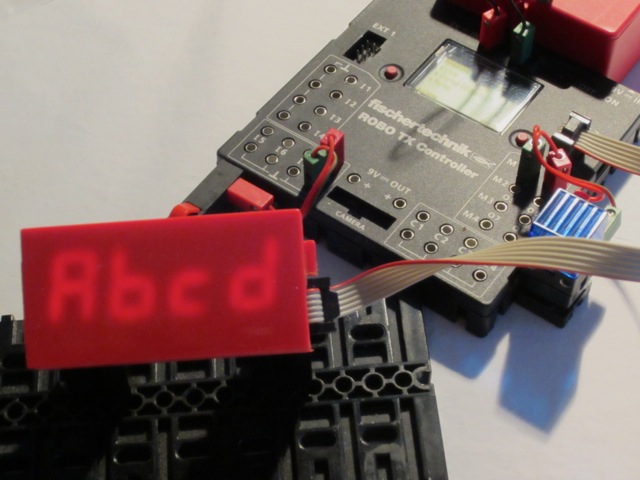
The smartLED is a 4-digit 7-segment display encased in a 9V red battery box (references 32263 and 32958). 

It is connected to the TX controller through I²C.

• Caution
Before using this device, please read the specification carefully sheet and check voltage requirements.
Picture

Device

  • Manufacturer:  Rei Vilo   
  • Break-out provider: 
  • Specification sheet: 
  • I²C address: 0x16

Standard Functions

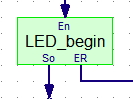
LED_begin   initialise the sensor 
  • Input: None
  • Output: None
  • Exit: So if valid, ER if initialisation failed

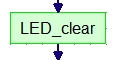
LED_clear   clear all the segments on the 4 digits
  • Input: None
  • Output: None

Picture
Picture
Picture
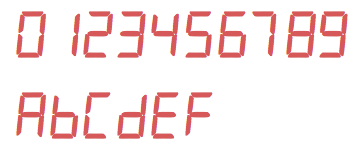
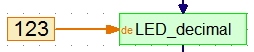
LED_decimal   display a decimal number from 0000 to 9999
  • Input: number, Integer
  • Output: None

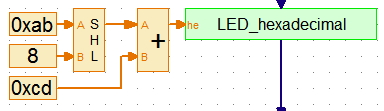
LED_hexadecimal   display an hexa-decimal number from 0000 to FFFF
  • Input: number, Integer
  • Output: None
Picture
Picture

Advanced Functions

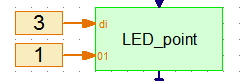
LED_point  switch the decimal point of the given digit off or on
  • Input: number of the digit, 0=off or 1=on, Integer
  • Output: None

Picture
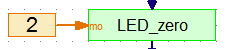
LED_zero   set the leading zero mode
  • Input: mode 0, 1 or 2, Integer
  • Output: None
with 0=keep all leading zeroes, 1=hide all leading zeroes , 2=hide leading zeroes before decimal point.

Picture
LED_set   switch the segments of the given digit off or on
  • Input: number of the digit, binary coding value, Integer
  • Output: None

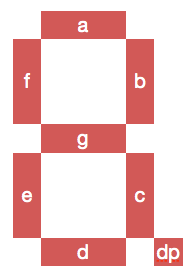
The binary coding of the segments used is:
  • bit 0 = 2^0 = 1 = 0x01 for segment a
  • bit 1 = 2^1 = 2 = 0x02 for segment b
  • bit 2 = 2^2 = 4 = 0x04 for segment c
  • bit 3 = 2^3 = 8 = 0x08 for segment d
  • bit 4 = 2^4 = 16 = 0x10 for segment e
  • bit 5 = 2^5 = 32 = 0x20 for segment f
  • bit 6 = 2^6 = 64 = 0x40 for segment g
  • bit 7 = 2^7 = 128 = 0x80 for the decimal point or for the column between hours or minutes, depending on the display

Picture
For example, 
  • Displaying a capital A requires lighting the segments a, b, c, e, f and g. Adding a + b + c + e + f + g = 1 + 2 + 4 + 16 + 32 + 64 gives 119 or 0x77.
  • Displaying the minus sign only requires the g segment, thus 64 = 0x40.

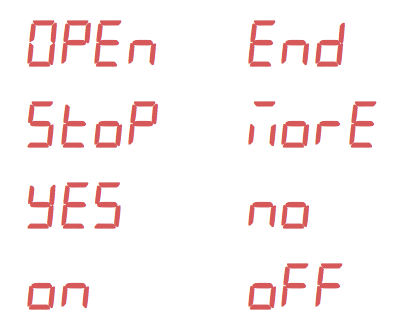
Try your own messages!
Picture
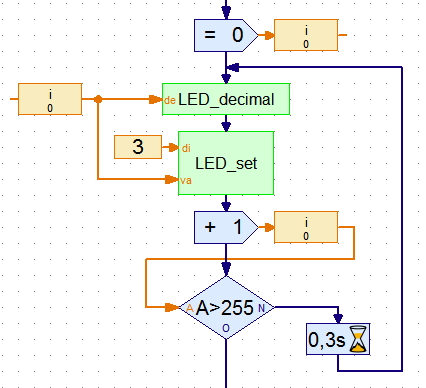
This example displays all the possible combinations on the left-most digit with the corresponding value on the three digits.
Picture

Download

Download the driver with an example for RoboPro.     

This file is under the Creative Commons Attribution-NonCommercial-ShareAlike 4.0 International License.
Powered by Create your own unique website with customizable templates.